Mapping on OpenStreetMap
Complete or correct pedestrian data on OpenStreetMap to generate accessible routes for SonarVision users with visual impairments (VI).
Last updated 4 days ago
This article is intended for relatively experienced OpenStreetMap contributors. If you’d like to learn how to contribute to OpenStreetMap, I recommend this guide.
The accuracy of pedestrian mapping is particularly important since we guide our users with an accuracy of about 30 cm. To learn more, see Visual Positioning System and GNSS RTK.
Key Attributes for Pedestrian Lines
The SonarVision route planner generates routes that prioritize exclusively pedestrian-only paths.
To align with the French OpenStreetMap community, I strongly recommend reading this page on the OpenStreetMap wiki: Pedestrian Paths.
Sidewalks
highway=footwayfootway=sidewalk
Crosswalks
highway=footwayfootway=crossing
The following two attributes are very important for route calculation and for SonarVision’s understanding of the environment for its DV users. They will soon be integrated into our route planner.
crossing=uncontrolled|traffic_signals|unmarkedtraffic_signals:sound=yes
Attributes such as tactile_paving=* are also valuable in their own right. Mapping them can help a local authority identify missing tactile markings and, potentially, alert a user during a trip.
Central Medians
highway=footwayfootway=traffic_island
We prioritized adding this attribute because a visually impaired pedestrian is highly vulnerable when crossing the street in two or three stages. This attribute is clearly marked in the app.
One might sometimes wonder whether a median island is worth mapping: My opinion is that we should only map median strips equipped with two tactile strips, allowing visually impaired users to confirm the information from SonarVision with their canes or feet and to have a space wide enough to wait comfortably.
Stairs
highway=stepsincline=up|downDepending on the direction of the line
Unlike for people with reduced mobility (PRM), stairs are not really an obstacle for visually impaired SonarVision users. They still pose a danger, however, particularly when descending.
Stairs are explicitly marked in SonarVision.
Other pedestrian routes used by SonarVision
highway=pedestrianWiki link. Use this for “pedestrian streets” where a pedestrian can walk across the entire width of the street.highway=pathWiki link. Use this for paths and trails. This attribute is currently given a negative weight in the SonarVision calculator because the overwhelming majority of users rely on the VPS system, which does not work on the vast majority of trails. Learn more: VPS GNSS RTK
Mapping Recommendation for Routing
Map pedestrian routes with a single, navigable, and simple line.
Follow the “center” of the sidewalk, crosswalk, staircase, etc.
Avoid permanent obstacles (bus shelters, benches, kiosks, parking spaces, etc.)
A “
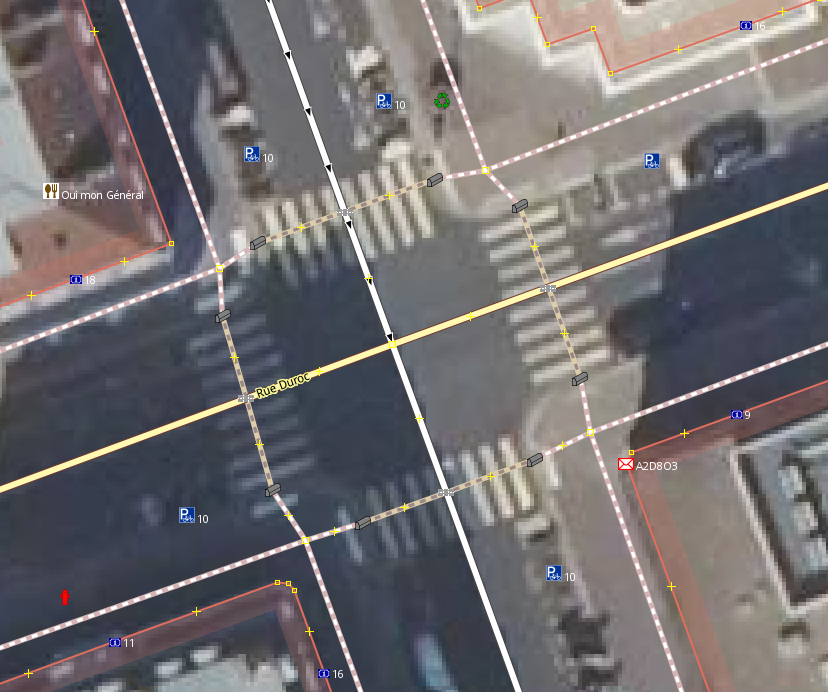
sidewalk” becomes a “crossing” at thekerblevel. It’s a bit more difficult to map, but mapping as closely as possible to the actual terrain allows instructions to be given to the user at the right time (SonarVision alerts the user that they are right in front of the crosswalk, exactly 1.50 meters away. before the start of thecrossing).
Here is an ideal mapping for an intersection:
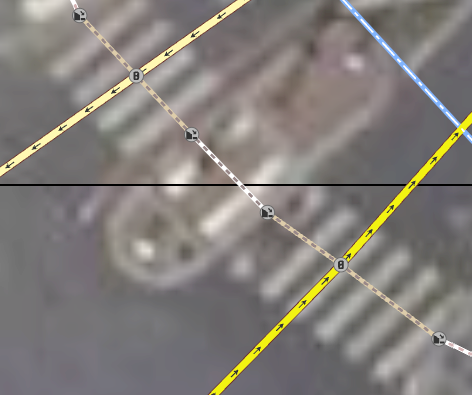
Here is an ideal map layout for a central median. Note that a “crossing” becomes a “traffic_island” at the “kerb.”
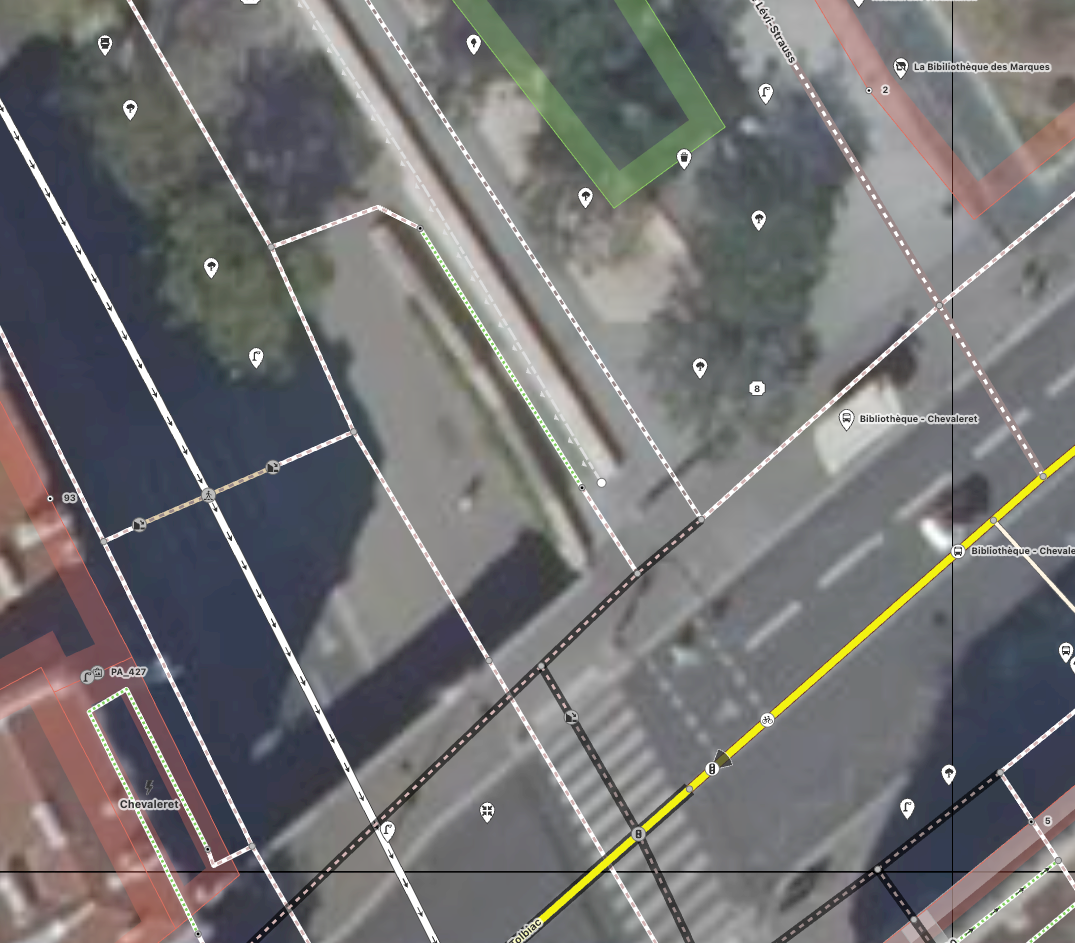
Here is an ideal map for a staircase. Note that the sidewalks and crosswalks on the bridge are set to layer=1 and bridge=yes to prevent them from intersecting with elements below.
Surface-based mapping
There are areas where sidewalks are mapped as surface features. This creates a nice visual effect on some maps, but is almost never used for route calculation.
When importing OSM data, SonarVision filters out (removes) all features tagged with area=yes or type=multipolygon
Indoor Routing
SonarVision now works indoors in certain facilities: Does SonarVision work indoors?
However, in general, SonarVision does not work indoors, so we filter out the following elements: indoor=yes
OpenStreetMap Editor Selection
ID
https://www.openstreetmap.org/
I recommend ID for its excellent preset management and its ease of use when editing a few features at a time. All presets for pedestrian paths are immediately compatible with the SonarVision route calculator.
JOSM
https://josm.openstreetmap.de/
For more ambitious pedestrian mapping projects, you’ll find yourself creating thousands of sidewalks and crosswalks. In terms of tags, you can almost always choose from the following six presets:
Sidewalk
Unprotected crosswalk
Unmarked crosswalk
Crosswalk with traffic lights
Crosswalk with traffic lights and audible signals
Median
In fact, most of the other features (highway=path, highway=pedestrian, highway=steps) have already been added to OpenStreetMap.
But ID doesn't yet have a good system of shortcuts for presets. You have to draw an element, then click on the preset on the left—over and over again. This is where JOSM shows its first advantage: you can import a preset file, add the presets to your toolbar, and then create keyboard shortcuts for them.
Download the preset file:
preset_footway.xml
3 KB• Text
Add it to JOSM
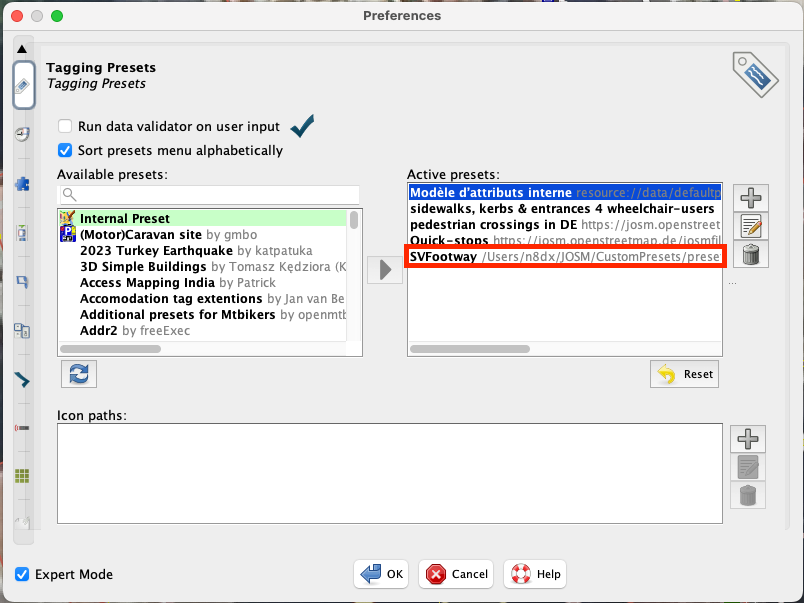
Add the presets to the toolbar
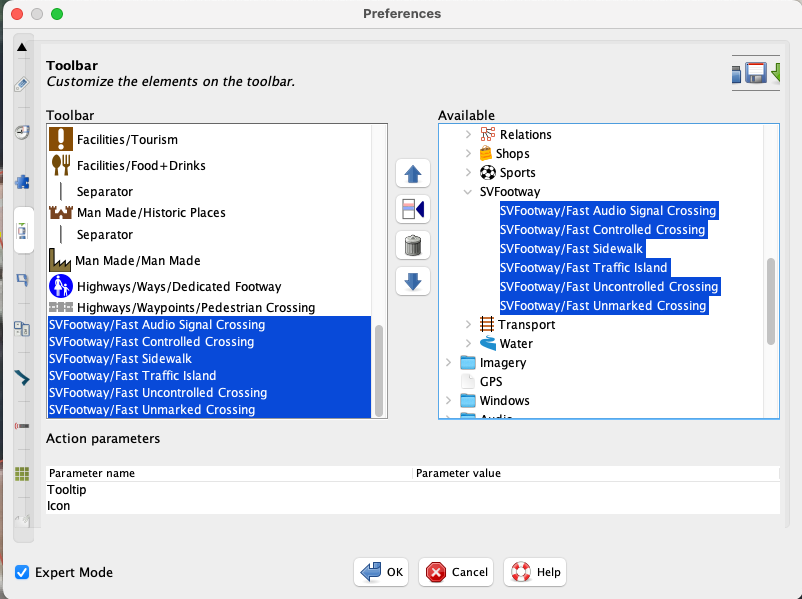
Add keyboard shortcuts for these presets.
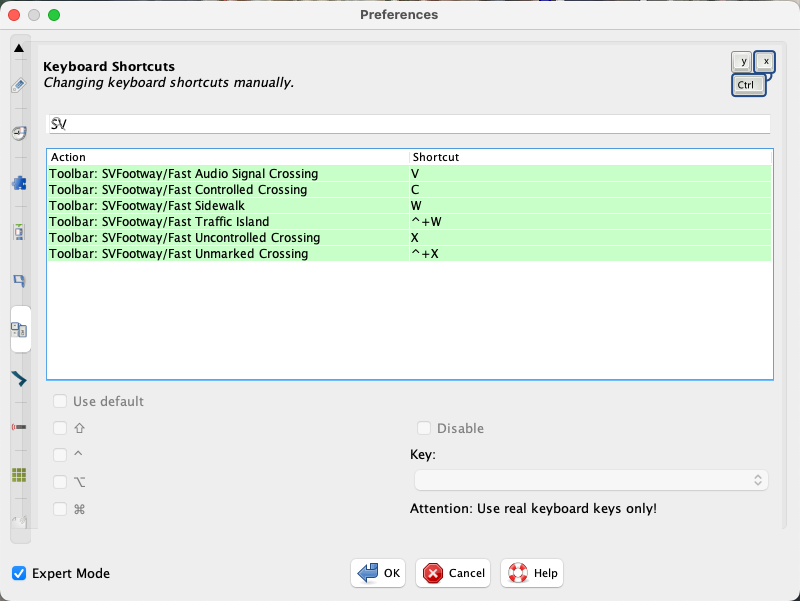
It takes a good ten minutes to set this up using the JOSM interface, but you’ll gain a huge boost in productivity—and preserve your sanity—if you’re mapping large areas on OpenStreetMap.
Simplified operation of the route calculator
Every day at midnight (UTC+01:00), SonarVision downloads the changes made to OpenStreetMap that day and updates its own copy of the global OSM dataset.
Recalculating and then running a route planner is a very computationally and RAM-intensive task, so to reduce the load somewhat, we only keep a portion of the world and filter out attributes that pedestrians will never use (primarily high-speed roads). Our current server for the route planner has “only” 32 GB of RAM.
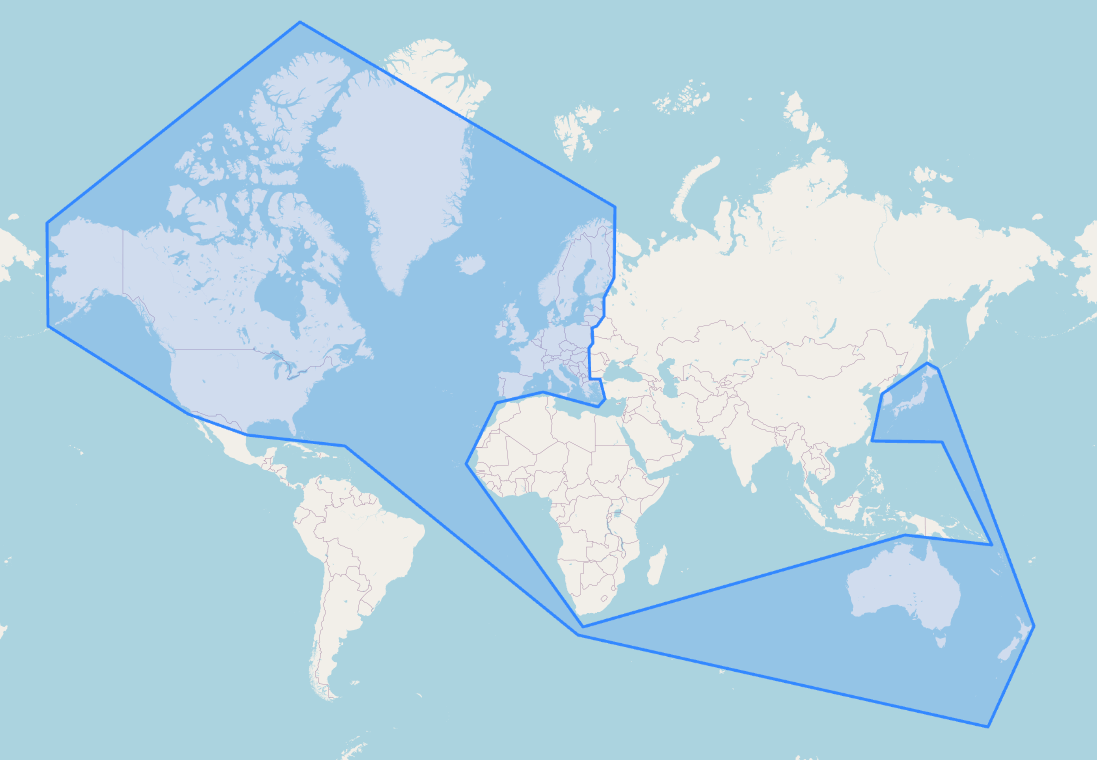
We then recalculate the navigation graph for all the roads stored in that area.
My apologies for this somewhat arbitrary division. If your region isn’t covered, please contact us—we can adjust it quickly:
Use the route calculator to validate your contributions.
The easiest way is to test it at Graphhopper's web interface, the calculator we use and have left publicly accessible for now.
Alternatively, if you really want to test the routes as they’re generated by SonarVision users, visit You can create an account.
Contact us if you need anything else:
contact@sonarvision.fr
Still need help? Ask the team